Private DNS and a TLS gateway for .homelab domains
I wanted https://status.homelab instead of https://status.mist-walleye.ts.net. Short names, real TLS, accessible from any machine on the tailnet. Getting there required an Unbound recursive resolver, a virtual IP trick to dodge a port conflict, and Caddy's internal CA issuing certs for a TLD that doesn't exist.
The architecture
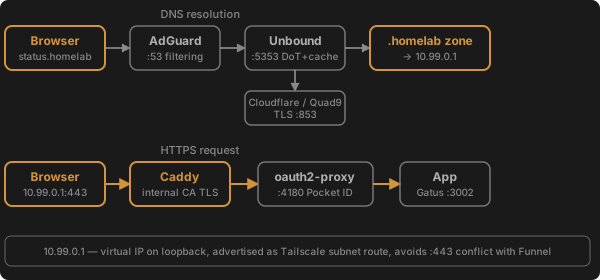
Three layers, each solving one problem:
-
Unbound on port 5353 — recursive resolver with DNSSEC, serves a
.homelablocal zone. AdGuard Home forwards to it as upstream DNS. Every.homelabrecord points to10.99.0.1. -
Caddy bound to
10.99.0.1:443— terminates TLS using its built-in CA, reverse proxies to each service's oauth2-proxy or app port directly via the sidecar's Tailscale IP. -
10.99.0.1 — a virtual IP on loopback, advertised as a Tailscale subnet route. Exists solely because Tailscale already holds
:443on the host's real Tailscale IP for Funnel traffic. No port conflict, no non-standard ports.
Setting up Unbound
Fedora ships Unbound. The homelab config goes in /etc/unbound/conf.d/homelab.conf:
server:
    port: 5353
    interface: 127.0.0.1
    interface: ::1

    access-control: 127.0.0.0/8 allow
    access-control: ::1/128 allow
    access-control: 100.64.0.0/10 allow  # Tailscale CGNAT

    root-hints: "/etc/unbound/root.hints"
    hide-identity: yes
    hide-version: yes

    # CA bundle — required for DNS-over-TLS to upstream resolvers
    tls-cert-bundle: "/etc/pki/tls/certs/ca-bundle.crt"

    # Aggressive caching
    msg-cache-size: 64m
    rrset-cache-size: 128m
    cache-min-ttl: 300
    cache-max-ttl: 86400
    serve-expired: yes
    serve-expired-ttl: 86400
    prefetch: yes
    prefetch-key: yes

    local-zone: "homelab." static

# Forward over TLS to Cloudflare + Quad9 (fast, private, DNSSEC-validated)
forward-zone:
    name: "."
    forward-tls-upstream: yes
    forward-addr: 1.1.1.1@853#cloudflare-dns.com
    forward-addr: 1.0.0.1@853#cloudflare-dns.com
    forward-addr: 9.9.9.9@853#dns.quad9.net
    forward-addr: 149.112.112.112@853#dns.quad9.net
The initial version used root hints for full recursion — correct but slow (multiple round-trips per new domain). Switching to forward-tls-upstream with Cloudflare/Quad9 gives fast resolution with encrypted queries. The 100.64.0.0/10 ACL covers all Tailscale IPs. serve-expired serves stale records instantly while refreshing in the background — no visible latency even when cache entries expire.
Fresh root hints and a DNSSEC trust anchor:
sudo curl -so /etc/unbound/root.hints https://www.internic.net/domain/named.root
sudo unbound-anchor -a /var/lib/unbound/root.key
Individual .homelab records live in /etc/unbound/local.d/, one file per service:
local-data: "status.homelab. 60 IN A 10.99.0.1"
Low TTL because I spent too long debugging stale DNS caches in AdGuard.
Auto-registration via Quadlet lifecycle hooks
Every Tailscale sidecar container gets ExecStartPost and ExecStopPost hooks:
[Service]
Restart=on-failure
RestartSec=5
ExecStartPost=%h/IdeaProjects/infra/dns/dns-register.sh status status
ExecStopPost=%h/IdeaProjects/infra/dns/dns-unregister.sh status
The register script writes the record and reloads Unbound. The unregister script removes it. Sudoers rules allow unbound-control reload and writing to /etc/unbound/local.d/ without a password.

No manual bookkeeping.
The virtual IP trick
The host's Tailscale IP (100.73.161.25) already has port 443 claimed by Tailscale for Funnel traffic. Caddy can't bind there. Using a non-standard port like 8443 works but means every URL needs :8443 appended — ugly.
The fix: add 10.99.0.1/32 to the loopback interface and advertise it as a Tailscale subnet route.
sudo ip addr add 10.99.0.1/32 dev lo
sudo tailscale set --advertise-routes=10.99.0.1/32
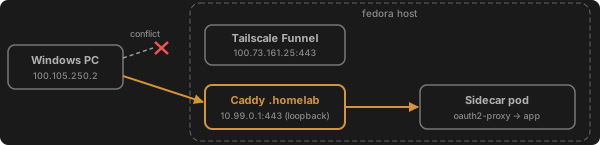
A oneshot systemd unit (homelab-vip.service) persists the IP across reboots. After approving the route in the Tailscale admin console, any tailnet machine can reach 10.99.0.1:443 — which is Caddy, not Tailscale.
Caddy as TLS gateway
Caddy's tls internal directive uses a built-in ACME CA to issue certs for any domain. No Let's Encrypt (can't validate a private TLD), no manual cert management.
(homelab_proxy) {
    bind 10.99.0.1
    tls internal
    reverse_proxy http://{args[0]}.mist-walleye.ts.net:{args[1]}
}

status.homelab {
    import homelab_proxy status 4180
}

forgejo.homelab {
    import homelab_proxy forgejo 3000
}
The snippet takes two args: the Tailscale hostname and the port. Services behind oauth2-proxy use port 4180; services with native auth (Forgejo, Portainer) use their app port directly.
Caddy proxies over HTTP to the sidecar's Tailscale IP, resolved via MagicDNS (status.mist-walleye.ts.net). This bypasses ts-serve, which matters — ts-serve rewrites the Host header and breaks oauth2-proxy's CSRF cookie domain detection.
Client setup
One-time: install Caddy's root CA cert on each device.
The cert lives at ~/.local/share/caddy/pki/authorities/local/root.crt on the server. On Windows:
certutil -addstore -f "Root" root.crt
On macOS: add to System keychain, mark as trusted. On Linux: copy to /usr/local/share/ca-certificates/ and run update-ca-certificates.
After that, https://status.homelab just works — green padlock, no warnings.
The CSRF cookie problem
The first attempt broke on OAuth callbacks. oauth2-proxy sets a CSRF cookie during the login redirect, then checks for it when the callback returns. Two things went wrong:
Wrong cookie domain. OAUTH2_PROXY_COOKIE_DOMAINS=.homelab resulted in cookies with Domain=homelab (no leading dot in some oauth2-proxy versions). The browser wouldn't send it back for status.homelab. Fix: remove COOKIE_DOMAINS entirely and let oauth2-proxy scope the cookie to the exact request host.
Host header rewriting. Proxying through ts-serve rewrote the Host header to status.mist-walleye.ts.net, so oauth2-proxy generated callbacks for the wrong domain. Fix: proxy directly to oauth2-proxy's port (4180) via the sidecar's Tailscale IP, bypassing ts-serve.
What didn't work
- Let's Encrypt — can't issue certs for private TLDs.
- CNAME records to
*.mist-walleye.ts.net— TLS cert still saysstatus.mist-walleye.ts.net, browser sees SNI mismatch forstatus.homelab. - Binding Caddy to
:443on all interfaces — conflicts with Tailscale's listener. - Port 8443 — works but every URL needs the port appended, browsers default to HTTP on non-standard ports, and the oauth2-proxy cookie domain logic gets confused.
OAUTH2_PROXY_COOKIE_DOMAINS=.homelab— browsers interpretDomain=homelab(without dot) as an exact match, not a wildcard.- Editing Pocket ID's SQLite DB directly — WAL mode, rootless Podman volumes with SELinux, and app-level caching all conspire to lose your changes.
- DNS-over-TLS without
tls-cert-bundle— Unbound runs with a restricted filesystem view and doesn't know where the system CA certificates live. Withouttls-cert-bundle: "/etc/pki/tls/certs/ca-bundle.crt", every TLS handshake to Cloudflare/Quad9 fails with "unable to get local issuer certificate". Unbound returns empty responses, AdGuard gets nothing, total DNS outage. Insidious because cached records keep working for a few minutes before everything dies. - Full recursion from root hints — correct and private but slow. Every new domain requires multiple round-trips walking root → TLD → authoritative servers. Noticeable as multi-second page loads and failed subresource fetches on first visit.
Final state
Fourteen services accessible at https://<name>.homelab:
| Domain | Service |
|---|---|
| adguard.homelab | AdGuard Home |
| auth.homelab | Pocket ID |
| status.homelab | Gatus |
| code.homelab | OpenVSCode Server |
| files.homelab | copyparty |
| forgejo.homelab | Forgejo |
| metube.homelab | MeTube |
| pgweb.homelab | pgweb |
| pods.homelab | Portainer |
| services.homelab | Dashboard |
| studyforge.homelab | StudyForge |
| ollama.homelab | Ollama |
| plannotator.homelab | Plannotator |
| db.homelab | (PostgreSQL — TCP only) |
All authenticated via Pocket ID (passkey OIDC), auto-registered in DNS when pods start, TLS from Caddy's internal CA. The .mist-walleye.ts.net URLs still work — this is additive, not a replacement.